The lightweight work management system for fast moving teams
Component4 is a lightweight, inbox-based task and work management platform, with minimal overhead for faster collaboration with your team, customers, suppliers or clients.
No credit card required
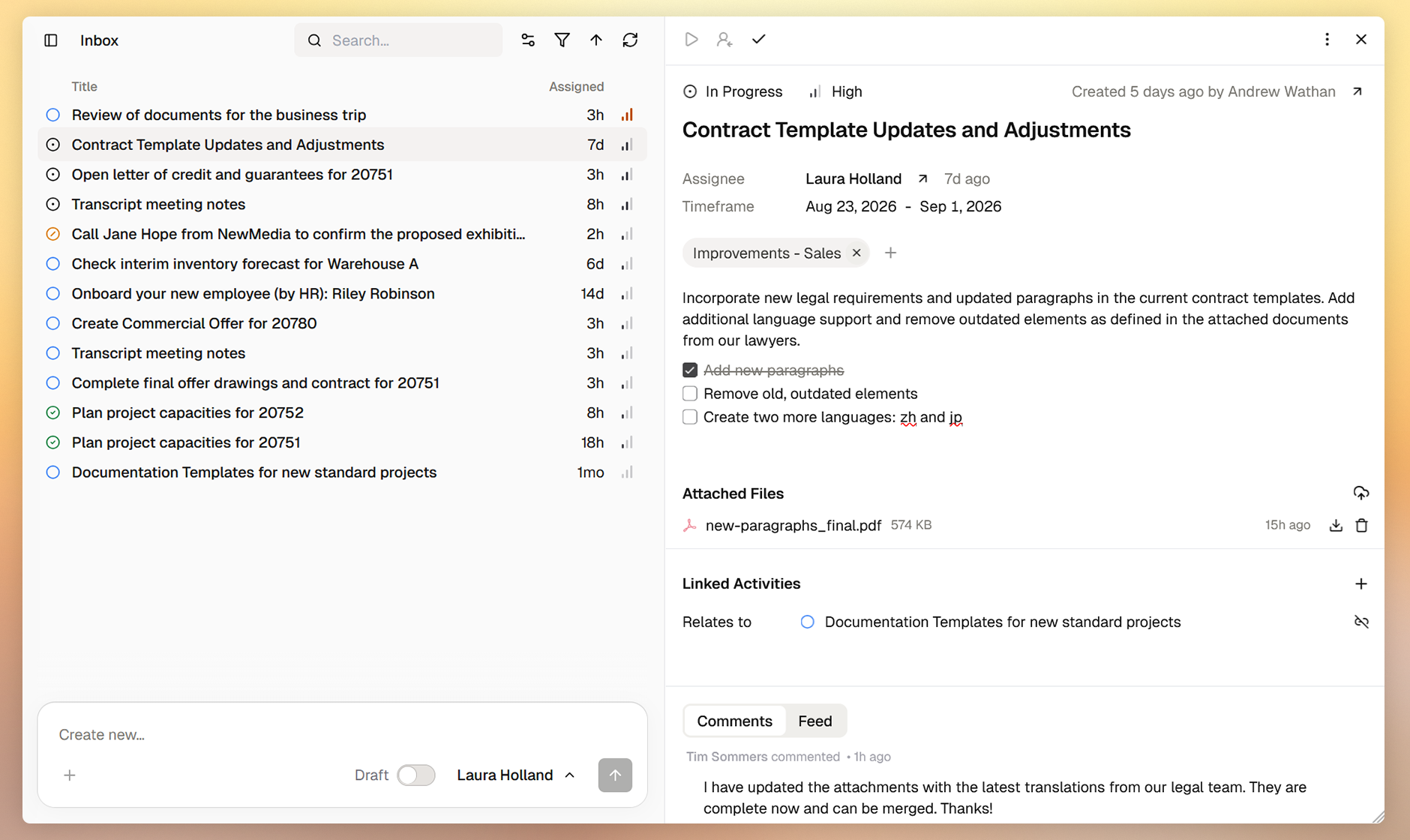
Seriously simple
Stay ahead of daily activities without overhead or complexity.
Activity
Component4 is organized around Activities, small work items that you assign to your or someone else inbox.
Inbox
Personal and generic, shared Inboxes allow simple but effective assignment and orchestration of your work.
Topics
Topics allow group related activities together. You can assign multiple topics to an Activity, like a tag.

Purpose-built for productive teams
Use Component4 as a single source of truth where every activity, work item or issue is logged with clear assignees, deadlines and a complete view of the required information.
Link related activities, keep the right team members informed and transform chaotic, unorganized work into structured, visible, and repeatable processes.
Make daily operations self-driving
Use Component4 to move and coordinate daily work across your company or team with minimal overhead. Create visibility and transparency for every single work item. Great to simplify recurring tasks and collaboration.
With simple inbox patterns you reduce user adaption time, implementation friction and required training for your team.

How to choose the right work management system:
Read the BlogDon't just track issues — move your work
Boosting productivity whilst putting people first.
Side-by-Side
The default, adaptive split view opens activity details directly next to your inbox instead of a new page.
Less mental overload
The activity details hide most of not used details. This progressive disclosure keeps the screen clean and easy to use.
Predefined, unified states
Activities follow a predefined, unified set of states allowing for faster setup and better interoperability between teams.
Everything your team needs
Component4 brings you all the essentials you would expect. Without clutter or complexity.
- Unified states and priorities for seamless collaboration.
- Assignments to individuals, groups or roles.
- Rich text descriptions, including inline to-do lists.
- Linking related, blocking or duplicated activities.
- File attachment with integrated PDF file viewer.
- Comments to track considerations, notes or progress.
- User-defined properties for structured information.
- Pinning favorites to the sidebar for quick access.
- Optional start and due dates.
- Topic tags for grouping related activities.

Solutions
The questions and considerations on why to choose Component4.
Defragmenting information
When information about an activity accumulates or changes, who keeps the complete picture?
Routing work to a group
When a task is delegated to a team, who has an overview of what everyone is doing, what's left undone and what shouldn't be done twice?
Vacations and sick leave
When team members are on vacation or sick leave, who has insights what's left undone?
Management insights
When managing employees, how do you guarantee their daily success without insights into what everyone is doing?
Related work and dependencies
When working on tasks that have dependencies, how do you see the status and outcome of the related activities?
History look-up
When making decisions based on past events, where do you look up results and considerations of completed activities?
With Component4 we traded the complexity of Jira for a more streamlined, faster and straightforward experience. While testing the beta, it already increased team acceptance and productivity measurable.
Anna Meyer
Product Manager
Frequently asked questions
A work management system is a platform used by teams to plan, coordinate, track, and execute daily tasks, ongoing processes, and larger projects across a small team or entire organization. It connects individual assignments to big-picture goals.
Component4 is designed for businesses, teams and individuals that need a lightweight and simple to use work management platform that accumulates minimal overhead. Dedicated to daily work and activities. Component4 can be used along with larger project management tools.
No. Component4 is very easy to learn for any type of day-to-day tasks and cross-team collaboration. Most users can learn all features in less than an hour.
Component4 is so lightweight because it is not built to be infinitely customizable and does not try to solve any enterprise-level requirement imaginable. Instead, it uses a straightforward way to manage tasks, implements simpler workflows, permissions, schemes and settings to ensure that daily to-do lists do not become a heavy administrative puzzle. Users do not get overloaded with too many choices and do not have to navigate over-engineered, fragmented interfaces that often prioritize high-level reporting over usability and productivity.
It is designed in a way that creating activities is as simple as sending a chat message, organizing and viewing them as simple as reading an e-mail. That is something people are already familiar with and can quickly incorporate into their daily work routine. Giving you the benefit of a quicker setup, more unified experience and lower to non maintenance requirements.